Passwords
The password manager in every 3mote seat
Your team's logins, API credentials, SSH keys and secure notes, encrypted on your device. 3mote can't read them, except in Automation vaults you choose to make for agents. Included on every plan, and built for the people and the AI agents on your team.
Your vaults
A vault for you, and vaults for your team
Everyone on your team except guests gets a Private vault. Make shared vaults for the logins a team uses together, and choose for each person whether they can view, edit or manage.
- Logins, API credentials, SSH keys and secure notes
- A password generator and built-in two-factor (2FA) sign-in codes
- Previous passwords are kept, so you can look back at what a login used to be
- Recently deleted keeps a removed item for 30 days
Sharing and recovery
Share with the right people. Get back in when you're locked out.
Share a vault with people, teams or roles. Locked out of every device? There are two ways back in.
- Share with people, teams and roles, and give each one view, edit or manage
- Approve a new device by comparing two lines of eight words across both devices: one for the device and one for your account
- Download a Recovery Kit and keep it somewhere safe. It gets you back in if you lose every device
- Choose a Recovery Group of people you trust. As long as one of them can still sign in on a trusted device, they can restore a teammate who lost their devices and their kit
- The Recovery Group can also open Private vaults, unless an owner turns that off in Settings
AI agents
Agents use a login without the password being shown to them
When an AI agent on a workstation needs a login, it asks to use an item for that one session. A person with access to the vault approves it from their own device.
- The value isn't shown to the agent. It is filled in for the agent, or attached to requests for the sites the item allows
- Access ends when the session ends, and you can revoke it sooner
- Agents get Use only access. They can't view, edit or manage a vault, and they can't open Private vaults
- Every request, approval and use is recorded in the vault's activity
Automation vaults, for work with no one around
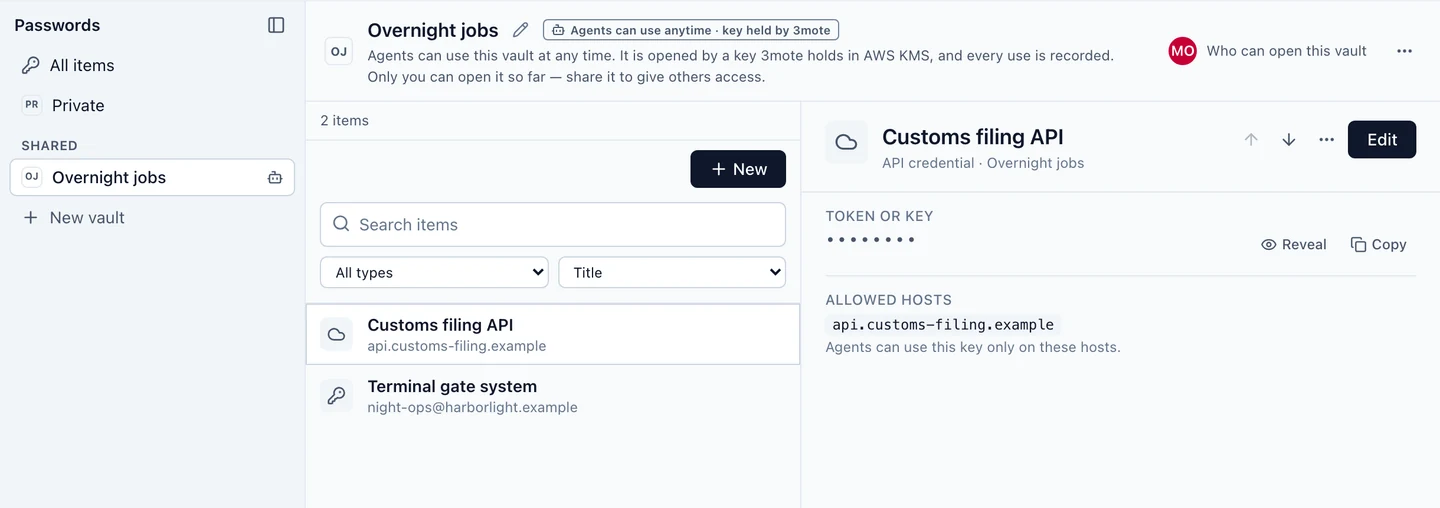
For overnight or unattended work, make a shared vault an Automation vault. Agents with Use only access can use its items at any time, without asking. Unlike your other vaults, it is not zero-knowledge: it is opened by a key that 3mote holds, so 3mote's service can open it when an agent uses an item. The vault says so, and every use is recorded. Opening Automation vaults with a key your company keeps in its own AWS account is coming on Enterprise.
One honest limit: if an agent has used a password, changing that password at the website is the only certain way to take it back.
What 3mote can and can't see
3mote can't see
- Item titles
- Usernames and passwords
- Websites and notes
- Two-factor (2FA) setup keys
3mote does store
- The names of your vaults
- Who can open each vault, and with what permission
- The labels of your devices
- The activity log
Automation vaults are the exception: a key 3mote holds can open them. An agent's own written reason for a request is stored readable and may name items. And like any web app, Passwords runs code that 3mote serves to your browser. A tampered copy of that code could capture your keys, so we protect it, but Passwords is only as trustworthy as the code your browser receives.
Switching
Bring your passwords with you
Import from the tool you use today. Your file is read on your device and is never uploaded.
- 1Password (CSV or 1PUX)
- Bitwarden (JSON or CSV)
- LastPass (CSV)
- Chrome, Edge and Safari (CSV)
On every plan
Passwords comes with every seat. The plans differ in how many shared vaults you can make and how long the activity history is kept.
Free
- Passwords: a Private vault for every member except guests
- 3 shared password vaults
- 30-day history of password views and copies
- Automation vaults: agents can use a vault at any time, with every use recorded
Team
- Passwords: a Private vault for every member except guests
- Unlimited shared password vaults
- 1-year history of password views and copies
- Automation vaults: agents can use a vault at any time, with every use recorded
Enterprise
- Passwords: a Private vault for every member except guests
- Unlimited shared password vaults
- 7-year history of password views and copies
- Automation vaults: agents can use a vault at any time, with every use recorded
- Automation vaults opened by your own AWS key (coming soon)