Card activity
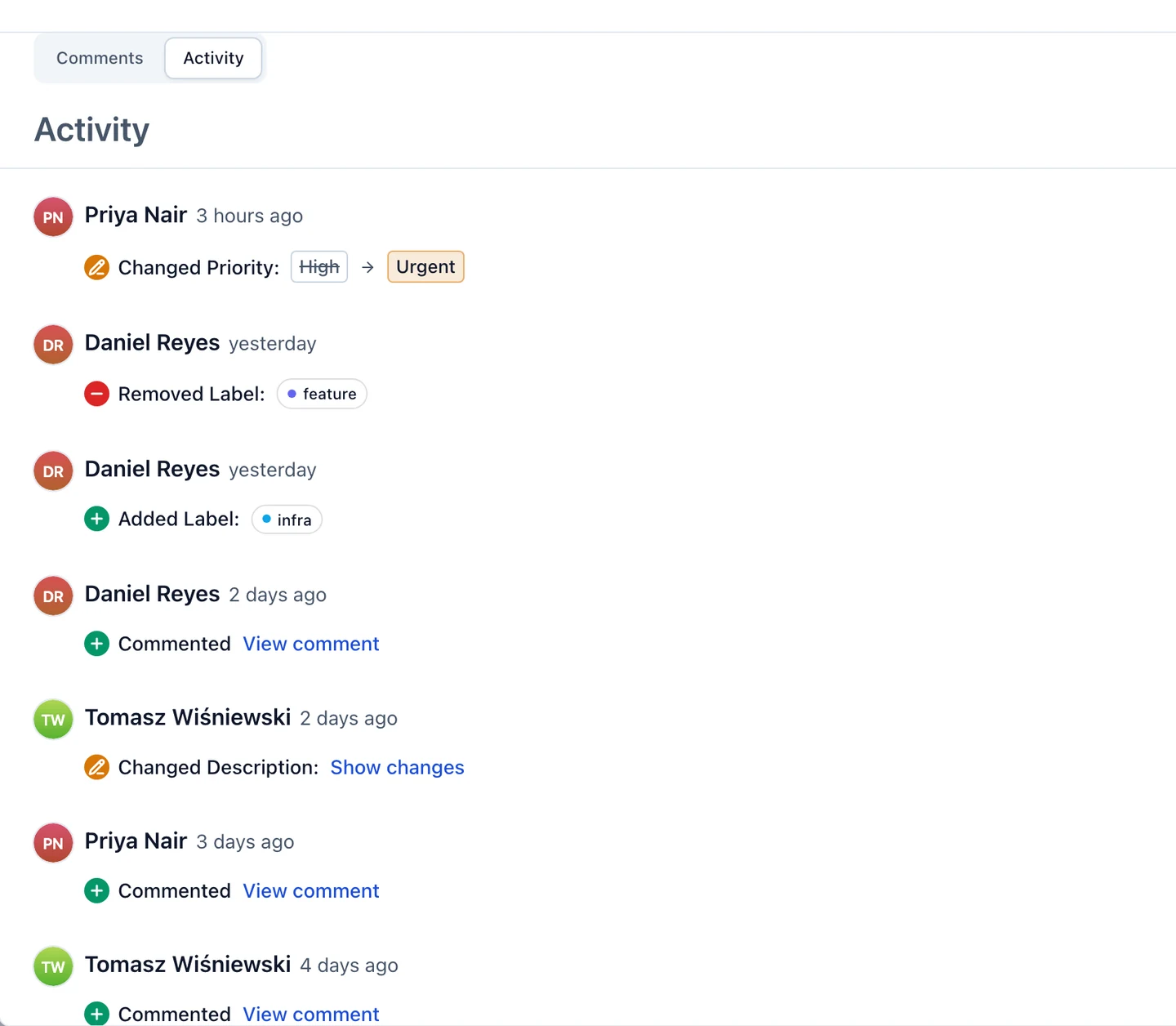
Every task, ticket, event and announcement keeps a permanent log of what happened to it. Open a card and switch from Comments to Activity under the description to read it. 3mote remembers the tab you used last, and opening a link to a particular comment always lands on Comments.
History is kept for as long as the card exists. There is no cap and nothing ages out.
What the log records
Each change is one line, grouped under the person who made it and when — hover the time to see the exact date and time. Everything saved in one go sits under one heading, so a single save that changed three things reads as “made 3 changes”.
- Field changes — title, description, status, priority, assignee, due date, story points, version, start and end, time zone, meeting link, and any field a card kind gains in the future. A status change reads plainly, with your project’s own column names: Changed Status: In Review → Shipped.
- People and labels — labels, reviewers, collaborators and attendees being added or removed.
- Dates and recurrence — an announcement’s dates, and a task or event’s recurrence rule.
- Files — Added attachment and Removed attachment, with the file name, whether the file came through the description, a comment or the Attachments section.
- Comments — Commented, Edited a comment and Deleted a comment. Click View comment to jump to it on the Comments tab, where it is highlighted. The log records that a comment was written, not what it said, so a deleted comment’s text is not kept anywhere.
- The card’s own story — Created this task, cloned from or to another card, and created as the next occurrence of a recurring card. A change made by 3mote itself, such as spawning the next occurrence of a recurring card, shows as 3mote.
Cards that already existed start with a Created entry, the column moves of a task or ticket, and one entry per existing comment, so an older card’s log is not empty. File changes and deleted comments from before the log existed cannot be reconstructed.
A few things are deliberately left out: dragging a card up or down inside its column, the finish date 3mote stamps when a card reaches Done (the status change already records the move), the column an event or announcement sits in (3mote works that out from its dates), emoji reactions, and card deletion.
Reading the colours
Each line starts with a small coloured badge, an icon and a verb, so colour is never the only signal. The same key covers comments and files too.
| Verb | Badge | What it shows |
|---|---|---|
| Added | Green, plus sign | The new value |
| Removed | Red, minus sign | The value that went away, struck through |
| Changed | Amber, pencil | The old value, struck through, then the new one |
For a description or an announcement’s body, click Show changes to see the words that were added (underlined, green) and removed (struck through, red). View previous version shows the earlier text exactly as it was formatted.
Reverting a change
Anyone who can edit the card can undo one field at a time. Hover a line — it highlights — and click Revert at its end (on a touch screen the button is always visible). A confirmation shows the value that will be restored — Revert applies it. For a description, the confirmation shows the full current text beside the text it will become, with the words that change marked.
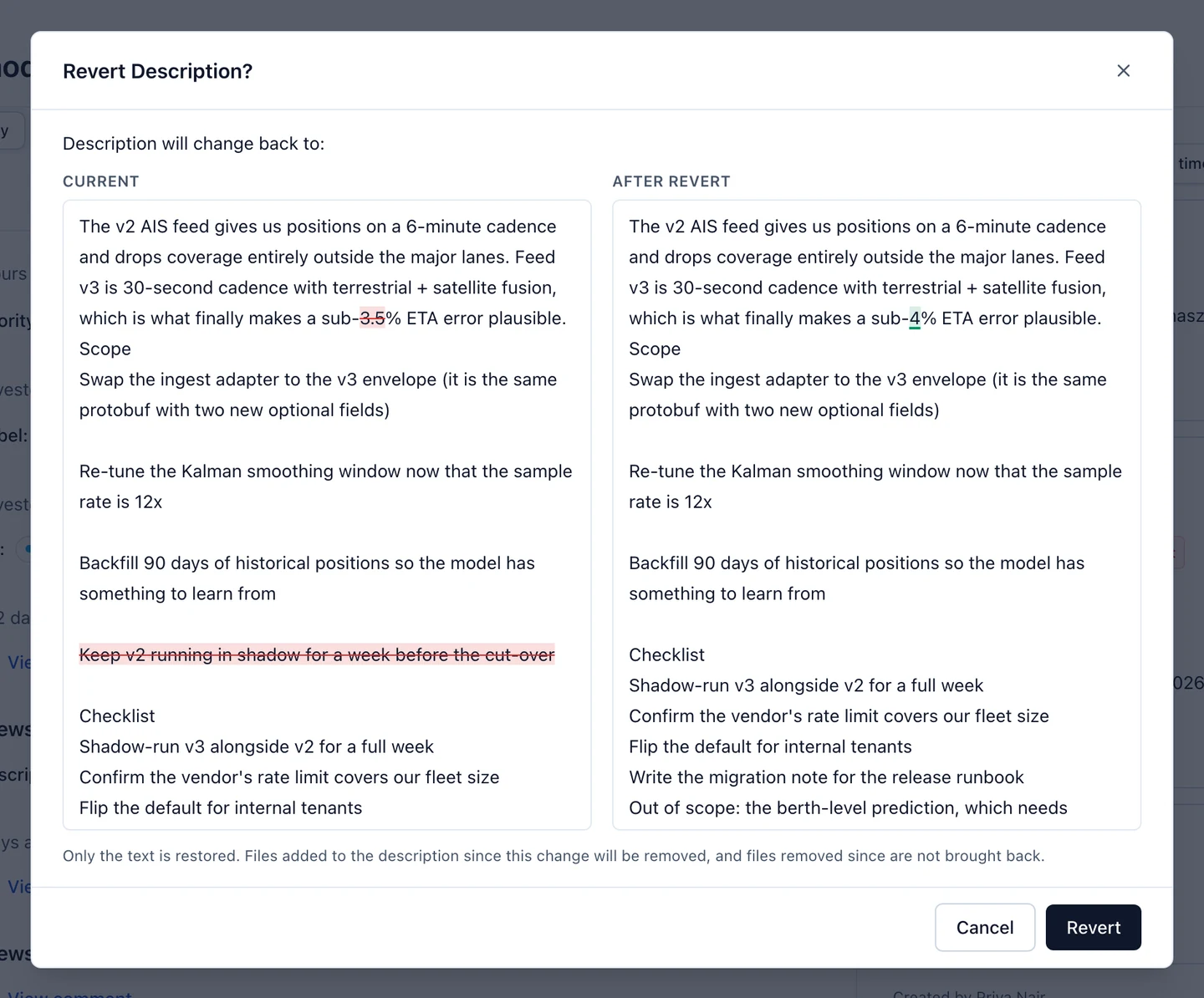
A revert is not an undo that erases history. It is a new edit, logged like any other: the line reads “Reverted Maya’s change to Priority”, and the original line gets a Reverted by tag. Reverting a revert works too. Reverting changes only the one field you chose — there is no “revert this whole save” and no “restore the card to this point”.
- If the field has changed since. The confirmation says so and shows the current value that will be overwritten. Choose Revert anyway to go ahead. Nothing is blocked.
- If the old value no longer exists. A status column, version, label or person that has since been deleted or removed cannot be restored, so Revert is dimmed with the reason: This value no longer exists.
- If it is already the value, or the line was already reverted. There is no Revert button; a reverted line carries its Reverted by tag instead.
- Reverting a description restores the text only. Files added to the description since that change are removed, and files removed since are not brought back.
Files and comments cannot be reverted — they show in the log for reference only. Readers and Commenters can read the log but not revert anything.
For the rest of the card, see Card details.