Writing pages
Open a page and click Edit to start writing. The title sits inline at the top — click it and type. Add an icon beside it with Add icon.
The toolbar
A toolbar runs across the top while you edit: the text style dropdown (Normal text, Heading 1–Heading 6), Bold, Italic, Underline, Strikethrough, Inline code, Bullet list, Ordered list, Task list, Quote, Code block, Insert link, Insert table, Insert emoji, and Attach file. On a narrow window the lower-priority buttons collapse into a ⋯ menu, which on a page also lists every block you can insert. Cmd/Ctrl-B, -I and -K do bold, italic and link.
Lists
Start a line with - and a space for a bullet list, or 1. and a space for a numbered list. Tab indents an item one level and Shift-Tab brings it back out. Each level of a list uses its own marker: numbered lists go 1, a, i and then start over, and bullet lists go filled dot, hollow dot, square. The same lists work in card descriptions, comments and chat messages.
You can mix the two. Indent an item, then type - and a space at the start of it to turn it into a bullet under a numbered item, or 1. and a space to put a numbered item under a bullet.
Backspace at the start of an item takes it out of the list and leaves its text as a plain line in the same place. The items below it keep their numbering. Press Backspace again to join that line onto the end of the item above.
The slash menu
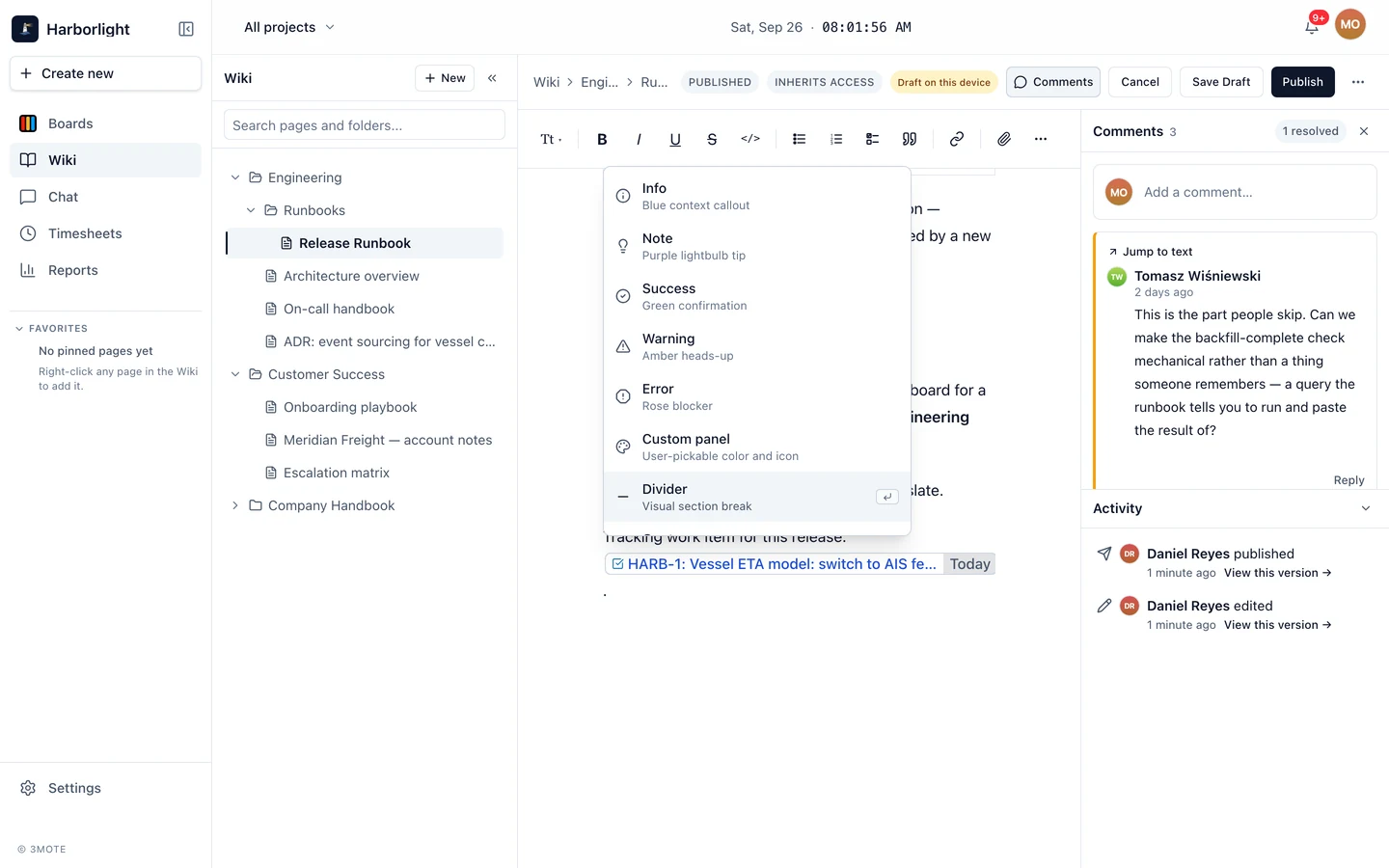
Type / at the start of an empty line to open the block menu, then type to filter. Arrow keys move, Enter inserts, Escape closes. Twenty-two blocks in five groups:
| Group | Blocks |
|---|---|
| Callouts | Info, Note, Success, Warning, Error, Custom panel (pick your own colour and icon) |
| Basics | Divider, Quote, Bullet list, Numbered list, Link |
| Structure | Expand (a collapsible section), Table |
| Inline marks | Action item, Status (an inline lozenge), Date (a date chip), Mention, Emoji |
| Embeds | Image, Video, File, Work item |
The menu doesn’t open inside a code block or an action item, and a callout doesn’t take another callout inside it.
Links, mentions, and references
- Page links — type
[[to search your wiki by title. The page you pick becomes a chip that opens in a new tab. - Mentions — type
@and pick a teammate; they get a notification pointing at the page. See Notifications. - Work-item references — type a card’s code followed by a space or punctuation (for example
HARB-30) and it becomes a chip showing the card’s kind, title, and column. The chip appears only once 3mote has confirmed the card exists; a code that matches nothing stays as typed. The Work item block opens a picker instead. A chip’s⋯menu offers Open card, Copy link, and Convert to text. Pasting or typing a link to a task, ticket or event makes the same chip — either the card’s own page address or the address of a board with that card open — as long as the card is in this workspace and 3mote can confirm it; a link it can’t resolve stays an ordinary link, and announcements always do. See Cards.
Tables
Insert one with /table or Insert table. A table doesn’t nest, so both do nothing while the cursor is already inside one.
Click a cell for a menu with Add row above / Add row below, Add column left / Add column right, Delete row, Delete column, and the three cell text alignments; a strip below sets the Header row color and offers Copy table and Delete table.
Enter starts a new line inside the cell you are in, and Shift-Enter makes a soft break within a line. A cell holds far more than a single line of text: several paragraphs, bullet and numbered lists, action items, quotes, code blocks and images all sit inside one.
The / menu works inside a cell too, so a cell can hold a callout, an expand section, a divider, a date, a status, a mention or a work-item reference. The one thing it will not insert there is another table.
Drag the divider between two columns to set a column’s width. Widths are saved with the page. A table wider than the page scrolls sideways inside it rather than squeezing every column thin.
Copy table puts the whole table on the clipboard without you having to select it first. Paste it into a document or another editor and you get a table. Paste it somewhere only plain text is accepted, such as a terminal or a plain-text email, and you get a Markdown table. Selecting cells by hand and copying them works the same way.
Pasting a table in from another tool keeps its shape: the column count, the header row, cells holding more than one paragraph or a list, and cells spanning more than one column. Blank lines that the other tool padded its cells with are dropped, so the content sits at the top of each cell. A table nested inside another table is flattened to text, since a cell cannot hold a table.
To clear a stray blank line at the top of a cell, put the cursor on it and press Backspace.
Action items
/action item inserts a checkbox that anyone who can see the page can tick, even without edit rights — see Search and action items.
Images, video, and files
Three ways in:
- Drag it from your computer onto the page while editing. It inserts at your cursor, not where you dropped it. Images render inline, MP4 / WebM / MOV become a video player, and anything else becomes a file chip readers can preview or download.
- Attach file on the toolbar — same result, from a dialog.
- The Image, Video, and File slash blocks.
Each upload shows its progress in place. A failed one stays put with Retry and Dismiss — nothing vanishes silently — and Save Draft and Publish wait until every upload has settled. Videos up to 200 MB; other files up to 100 MB.
Pasting
Paste rich text from another document and its formatting comes across — headings, lists, links, inline code, tables. A pasted table keeps its columns, including one whose cells hold several paragraphs or a list, and a range copied out of a spreadsheet becomes a table too. Paste raw Markdown and 3mote converts it into real blocks. Runs a word processor expressed as a monospace font become inline code.
Paste an image, video or file from somewhere else in 3mote — a card, a comment, another wiki page, or a chat you’re in — and the page gets its own copy. Deleting the original later doesn’t affect this page. While the copy is made, Save Draft and Publish wait, showing “Copying 1 pasted file into this page…”. A file you can’t open, a file that’s too large, or one that would put the workspace over its storage limit isn’t copied; it’s taken out of the paste and a message says why. Pasting a file the page already has doesn’t make another copy.
Saving
Everything you type is captured as you go — see Drafts and publishing.