Cards
A card is one piece of work. 3mote has four kinds, each with its own glyph and colour so you can tell them apart on a crowded board.
Task
A to-do item that needs completing. A task carries:
- Assignee — one person, chosen from the project’s members.
- Priority — Low, Medium, High, or Urgent.
- Due date.
- Story Point Estimate — a number, optional.
- A description, labels, comments, and attachments.
Tasks can repeat on a schedule — see Creating and moving cards.
Ticket
A specific request from your team or manager. A ticket carries everything a task does — Assignee, Priority, Due, Story Point Estimate — plus:
- Reporter — whoever created the ticket. It is recorded automatically at creation.
- Software Version — free text, optional.
Event
A scheduled meeting or block of time off. An event carries:
- Start and End — date and time. End is optional.
- Time zone — defaults to your local zone.
- Meeting link — any
httporhttpsURL. When the event is happening, a Join button appears right on the card face. - Attendees — any number of people from the project.
Announcement
A team-wide notice: vacations, holidays, anything everyone should see. An announcement carries:
- Dates — one or more rows. Each row has a date, and either a start and end time (Time mode) or a number of hours and minutes (Duration mode).
- Time zone.
- Attendees.
- A body instead of a description.
An announcement can belong to a project or to no project at all. Leave the project blank and it becomes workspace-wide: it appears on every project board and in its own row at the top of the master board.
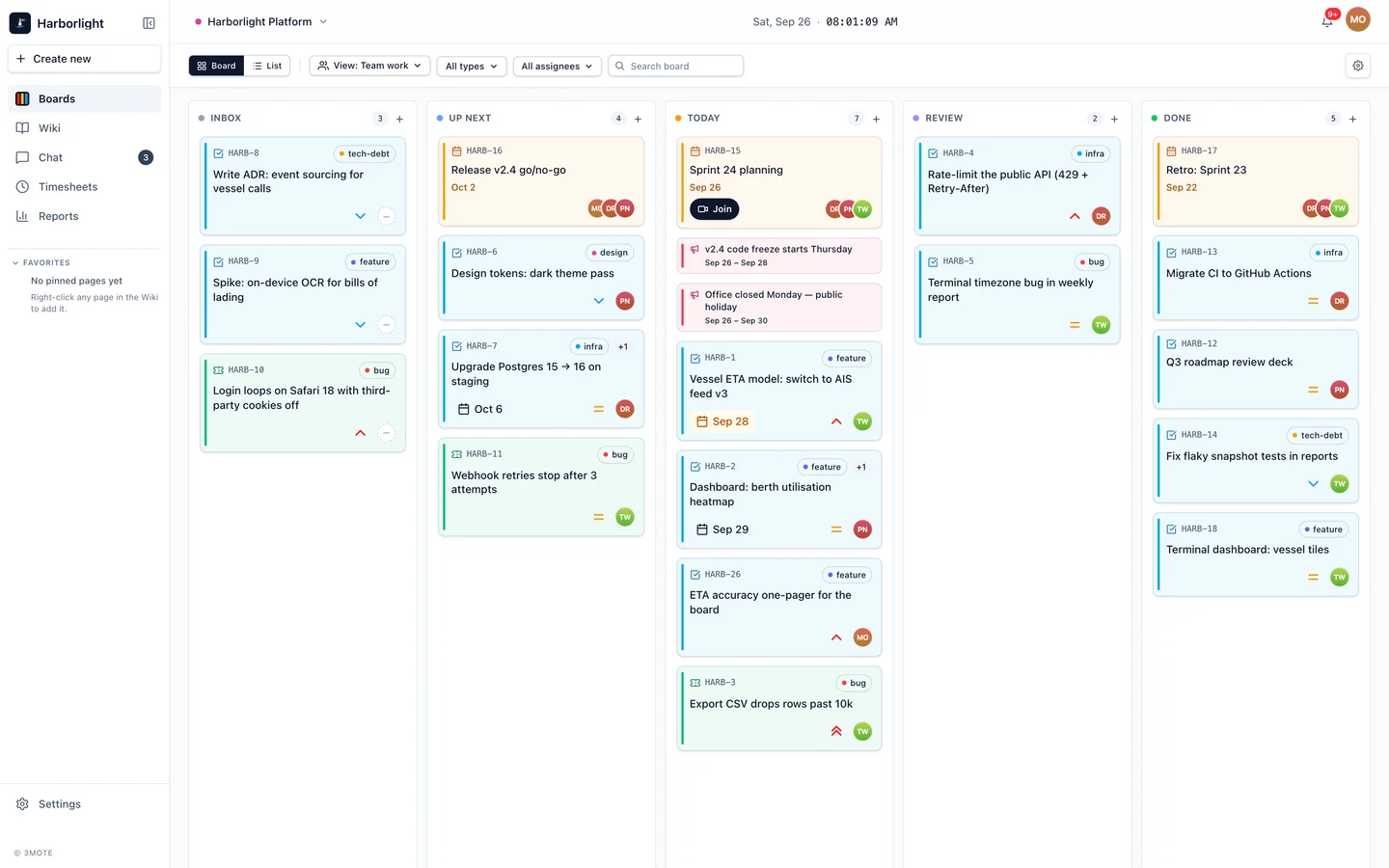
Card codes
Tasks and tickets get a short code when they are created, made from the
project’s code plus a number — HARB-12, for example. The code appears
at the top of the card face, in the header of the card’s detail view,
and anywhere the card is referenced from prose. It is assigned for you
and cannot be edited.
Events and announcements have no code; they are identified by their title and dates.
Events and announcements move by themselves
Tasks and tickets go wherever you drag them. Events and announcements do not: they live only in the Up Next, Today, and Done columns, and 3mote places them there based on their own dates.
- Scheduled for the future → Up Next.
- Happening today, or currently running → Today.
- Finished → Done.
A multi-day event or announcement stays in Today for the whole of its window, not just the first day.
Because the dates decide the column, these two kinds cannot be dragged; attempting it tells you so. To reschedule one, change its dates in the card’s detail view and it moves itself — see Card details.
Instead of a single assignee, event and announcement cards show a small
stack of attendee avatars on the card face, up to three, with a +N
pill for the rest.
What a card face shows
Card faces stay deliberately quiet: the card code, up to one label chip
with a +N pill for the rest, the title, a due-date badge, a priority
chevron, a timer button, a repeat glyph if the card recurs, and the
assignee or attendees. Everything else waits in the detail view.