Wiki
Wiki is where your workspace keeps the things that outlive a card: policies, runbooks, onboarding guides, specs. Open it from Wiki in the left sidebar. A rail on the left holds your page tree; the right shows whatever you have open.
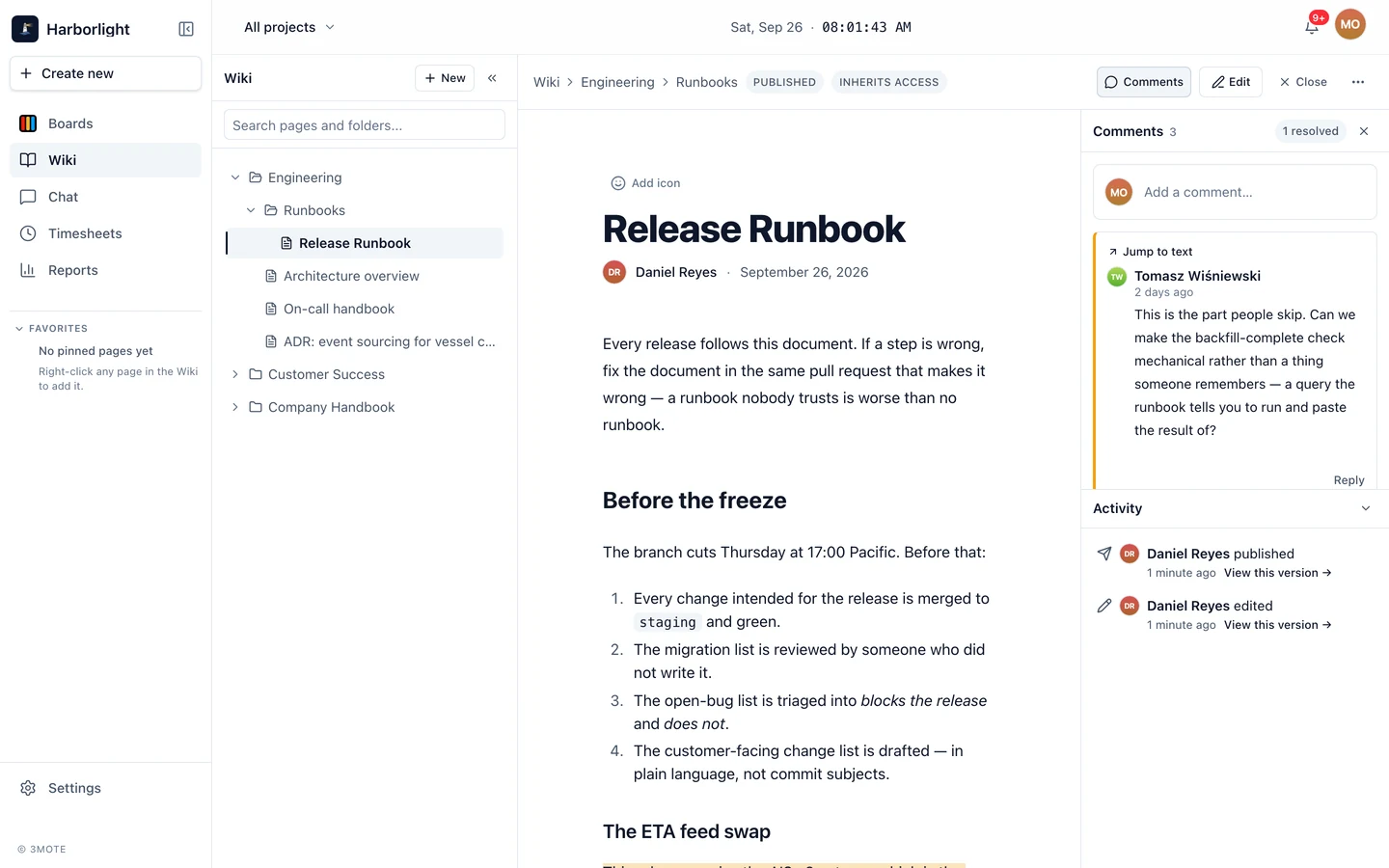
The page tree
The rail holds three kinds of row:
- Pages — documents you write in 3mote. See Writing pages.
- Folders — containers for pages, sub-folders, and files.
- Files — anything you upload: PDFs, images, videos, office documents. See Search and action items.
Click a folder’s chevron to expand or collapse it; folders nest as deep as you need. Opening a folder shows who created it, how many pages it holds, and its contents.
Creating something
Click + New at the top of the rail and pick one:
- New page — creates an untitled page and opens it with the title ready to type.
- New folder — prompts for a folder name.
- Upload file — opens the upload dialog. PDFs, images, videos (MP4, WebM, or MOV), or common office documents. Videos up to 200 MB; other files up to 100 MB.
New pages and folders land at the top level; drag one onto a folder or use Move… to file it away.
You can also drag files from your computer onto the rail: drop on a folder to put them inside it, on a page to put them alongside it, or on empty space to land at the top level. Folders can’t be uploaded — drop the individual files.
The row menu
Right-click any row — or hover it and click the ⋯ button — for its actions:
- Open and Open in new tab
- Rename, Duplicate (pages only), Set icon… / Remove icon
- Add to Favorites / Remove from Favorites
- Move… — pick a destination folder; the row lands at the end of its contents
- Share — see Sharing and access
- Download (files only)
- Delete
Dragging a row reorders and reparents it too. A line shows where it will land; hovering a closed folder opens it so you can drop inside.
Deleting a folder deletes everything inside it. Deleting a page or folder can’t be undone, and the files embedded in its pages stop counting toward your storage straight away. Which actions you see depends on your role and on the page — Rename, Move… and Delete appear only where they’d be accepted.
Favorites
Favoriting pins a page to a Favorites section in the main sidebar, one click away from anywhere in 3mote. Right-click a page and choose Add to Favorites; drag the pinned rows to reorder. Folders and uploaded files can’t be favorited.
Breadcrumbs and the rail
Every page, folder, and file shows a breadcrumb trail above its title, starting at Wiki — click any step to jump up the tree.
The collapse control at the top of the rail folds it away to give the page full width; the + button stays available while collapsed. A filter box narrows the tree to matching rows as you type.
On this section
- Writing pages — the editor, the
/menu, links, mentions, tables, images and files. - Drafts and publishing — autosave, Save Draft vs Publish, version history, edit locks.
- Sharing and access — who can see a page, per-page sharing, folder inheritance.
- Comments and activity — inline comments, the comments rail, reactions, activity.
- Search and action items — finding pages, ticking action items, uploaded files.