Sharing and access
Every wiki page and folder carries its own access settings. Open them with Share, from the page header’s ⋯ menu or by right-clicking the row in the rail.
The access chip
A chip in the page header gives the current answer at a glance: Inherits access (follows the parent folder), Restricted (only the people and teams listed on the page), Anyone can view, or Anyone can edit.
General access
The General access tab sets what everyone not named on the page can do. Pick one:
- Inherit from parent folder — follow whatever the folder above decides, now and as it changes. The option names that folder and what it currently resolves to. Not offered on a top-level page.
- Restricted — only people listed under People & Teams can open it.
- Anyone in this company can view — anyone in your workspace can read it.
- Anyone in this company can edit — anyone in your workspace can read and change it.
On an unpublished page, workspace-wide access only takes effect once you publish. Switching a page off inheritance asks for confirmation when people would lose access, and lists who.
Sharing with people and teams
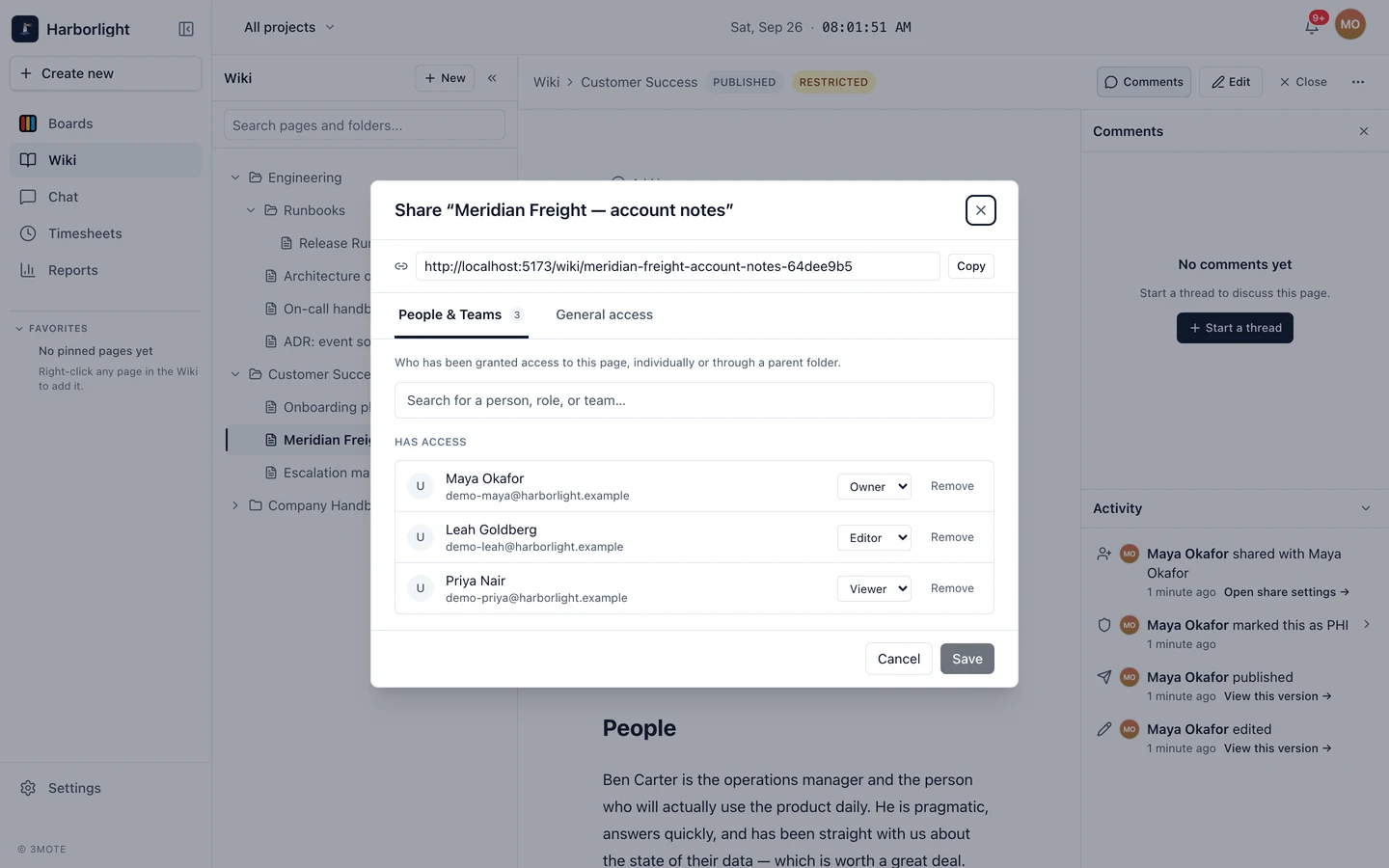
On the People & Teams tab, search for a person, a role, or a team and add them. Each entry gets a role:
- Viewer — can read it (and comment or react, if their workspace role allows).
- Editor — can read and change it.
- Owner — can also manage its sharing.
Grants on a folder flow down to everything inside it and appear on the child’s list annotated with the folder they came from — edit those on the folder. When someone is named at more than one level, the most permissive role wins.
Remove an entry with Remove, then Save. A page can’t lose its last Owner; an Account Owner or Administrator is the way back. Guests can only be given view access, and only see pages shared with them directly — see Teams, clients and guests.
Both tabs save together, and a badge on People & Teams warns you when your pending changes would take access away from someone, with Review who to jump to those rows. The dialog also carries the page’s link with a Copy button — sharing a link doesn’t grant access.
Folders and files
Folders and uploaded files share the same model: Share on a folder sets access for everything inside it, on a file for that file alone. Pages you can’t access don’t appear in your rail, and folders stay visible only when they hold something you can see.
What Readers can do
Your workspace role sets the baseline; per-page grants extend it. By default:
| Role | On the wiki |
|---|---|
| Reader | Read pages they have access to, react to them, and tick action items. |
| Commenter | The same, plus comment on pages and on comments. |
| Member | Create pages, edit and publish and delete their own, and comment. |
| Manager | Also edit and publish any page, and restore versions. |
| Administrator, Account Owner | Everything, including deleting any page and managing page sharing. |
Sharing extends permissions rather than capping them — a per-page Editor grant lets someone edit that page even when their workspace role wouldn’t. Administrators can change what each role is allowed; see Roles and permissions.
If your access changes while you have a page open, the page tells you so rather than failing silently.